01
Compile the project
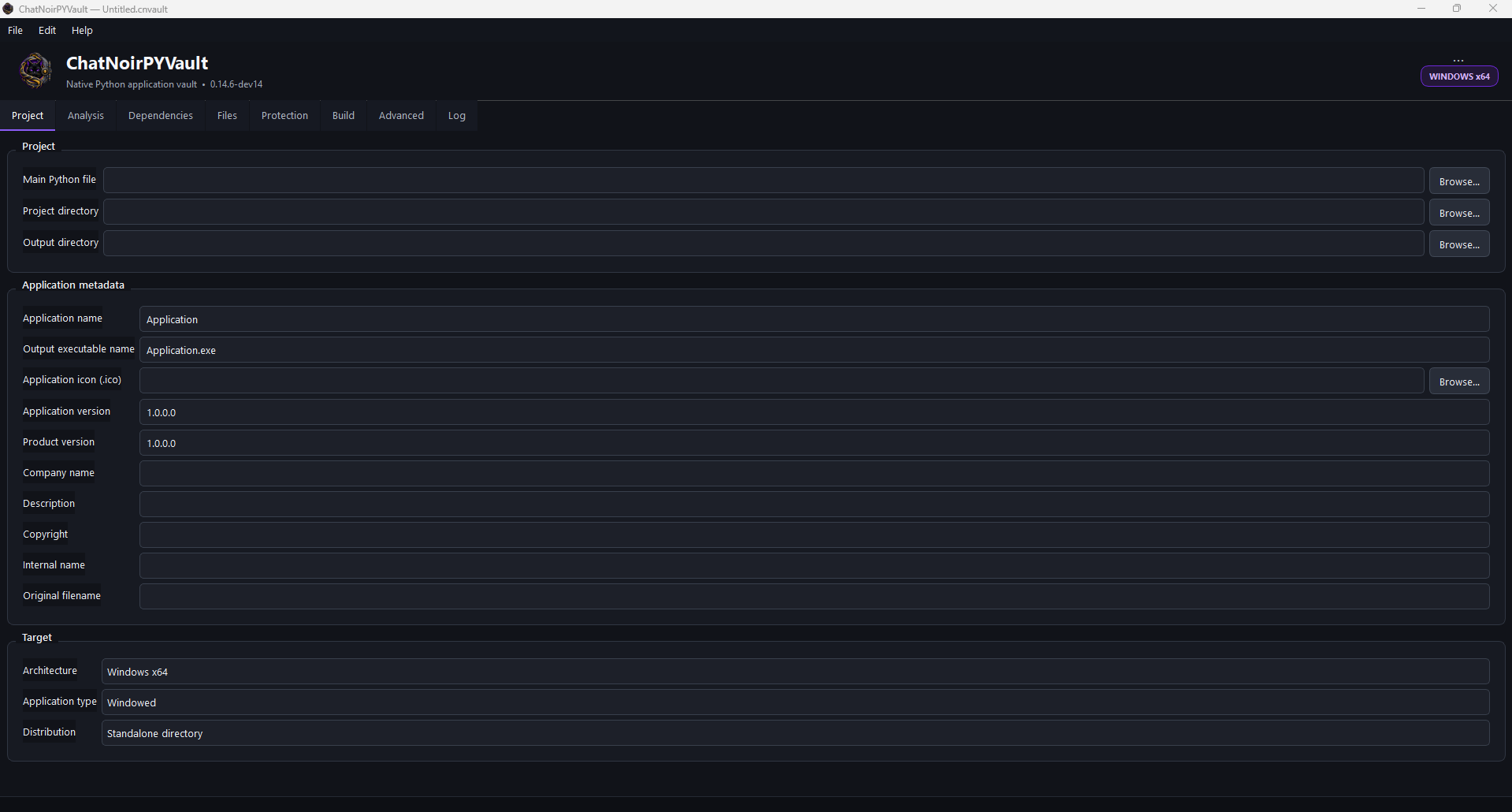
Select the main Python file and the project folder. PYVault analyses the project and prepares the files and modules required to build the application.
Chat Noir PYVault compiles Python projects into Windows executables. It is designed to take a complete Python application, analyse what it needs, compile the project and assemble a distributable executable through a guided graphical interface.
The goal is practical: make Python distribution easier, produce a more robust final application and raise the cost of reverse engineering compared with shipping plain source files or a minimally packaged script.
PYVault is intended for developers who want to turn a Python project into a Windows application without manually coordinating every compilation, dependency and packaging step.
Select the main Python file and the project folder. PYVault analyses the project and prepares the files and modules required to build the application.
The build process gathers the runtime, dependencies and application resources required by the selected project and produces a distributable Windows executable.
Compilation and optional protection make straightforward source recovery and static inspection more difficult than distributing ordinary Python source code.
PYVault brings compilation, protection, resource placement and packaging into one visual workflow. It is designed for complete Windows applications, not only small scripts.
The current packaging format supports up to 1,000,000 entries per package. In OneFile mode, the current technical ceiling for a single protected entry is 1 GiB. The complete application can therefore become very large, subject to the practical limits of the Windows toolchain and target machine.
The guided GUI lets you analyse a project, review detected files and dependencies, select resources individually or in groups, and decide whether they are bundled, kept external, placed beside the EXE or preserved in a project-compatible relative location.
Native compilation and optional protection profiles are designed to make source recovery, static inspection and reconstruction substantially more laborious while keeping configuration accessible through the interface.
OneFile or directory-style output, GUI or console mode, resources, dependencies, icons, version data, reports and placement choices are managed from the same project workflow.
The interface is organised around a guided sequence. Most projects can be prepared by moving from project selection to analysis, configuration, build and validation.
Point PYVault to the Python project and select the application entry point, normally the main `.py` file.
Run the project analysis and review detected modules, packages, resources and any warnings about dynamic imports.
Choose the output mode, application type, icon, version information and the protection level appropriate for the project.
Start the build. PYVault compiles the project and assembles the files required for the final Windows application.
Run the generated executable on a clean test environment and review the build report before distributing it.
Python source is normally easy to read when it is distributed directly. PYVault changes that distribution model by compiling project modules and packaging the application as a Windows executable.
With protection enabled, the objective is to increase the effort required for static analysis, extraction and reconstruction of the original application. This can improve practical resistance to casual copying and reverse engineering.
Each topic below expands independently. This keeps the page short while still providing enough detail for someone preparing a real project.
Start from a project that already runs correctly in its normal Python environment. Compilation is not a substitute for fixing application errors first.
Use the analysis stage before building. PYVault examines imports and project files so that the build can include what the application needs.
Pay particular attention to warnings about dynamic imports, plug-in systems or files loaded by name at runtime. Those patterns may require explicit inclusion because they cannot always be inferred from static source analysis.
Review third-party packages detected by the application. Libraries with native DLLs, plug-ins, QML files, models, themes or other external resources may need more than a simple Python import.
When the project uses data files, icons, templates or configuration files, ensure that they are included and that the application resolves them relative to the packaged runtime rather than assuming the original development folder still exists.
Choose the application type deliberately. Command-line tools normally need a console. Desktop GUI applications normally should run without opening a terminal window.
If a graphical application closes immediately, use the generated crash/startup report to identify whether the failure happened in the launcher, during extraction, in the Python runtime or after the application itself started.
Use stronger protection only after the application builds and runs correctly with simpler settings. Higher protection can increase build time and make diagnosis harder if the underlying project is already unstable.
The practical objective is to make automated inspection, direct source recovery and reconstruction less straightforward while preserving the behaviour of the original application.
OneFile produces a single executable for distribution. At runtime, the launcher prepares the components required by the application and starts the compiled program.
A single file is convenient, but it can be larger and its first launch may require more work than a directory-based distribution. Test both startup and shutdown behaviour before release.
Always test the executable outside the development environment. A build that works only on the machine where Python, compilers and every dependency are installed is not yet a reliable distributable build.
PYVault does not guarantee that an executable cannot be reverse engineered. That claim would be technically false. Any program that runs on a machine can, in principle, be studied.
What PYVault can do is change the economics of that analysis: remove the convenience of plain source distribution, compile project components, package dependencies and add protection so that recovery requires more skill, time and tooling.
The test file is deliberately simple: a PySide6 GUI containing only a short phrase and a button that reports success. Try every reverse-engineering tool and technique you consider appropriate.
Protection used: compiled with Chat Noir PYVault and protected with three layers only: ChatNoirVault_B, ChatNoirVault_C and ChatNoirVault_D.
A frontier AI analysed the same Chat Noir PYVault build and did not recover the Python program. Its complete analysis report is available on the test page.
For the most reliable result, validate the project in stages: working Python application → successful basic build → successful protected build → test on another Windows environment.